SUPPORT · AROUND THE CLOCK

How can we help?

Guides for getting started, answers to what sellers ask, and the status of the systems - and a way to reach a person for anything else.

EMAIL, ANY HOUR[email protected]

Our technology assistants answer around the clock; a person steps in for anything they cannot settle. We run our own warehouse on this system, so that person has usually had your problem.

WHEN YOU WRITE, INCLUDE
  • Your company name and the email you sign in with
  • The screen you were on and what you pressed
  • A screenshot if something looked wrong

GETTING STARTED

From sign-up to your
first order, step by step.

Seven short guides.
Most sellers are done in twenty minutes.

Create your account and company - screenshot
GUIDE 01 · 3 MINUTES

Create your account and company

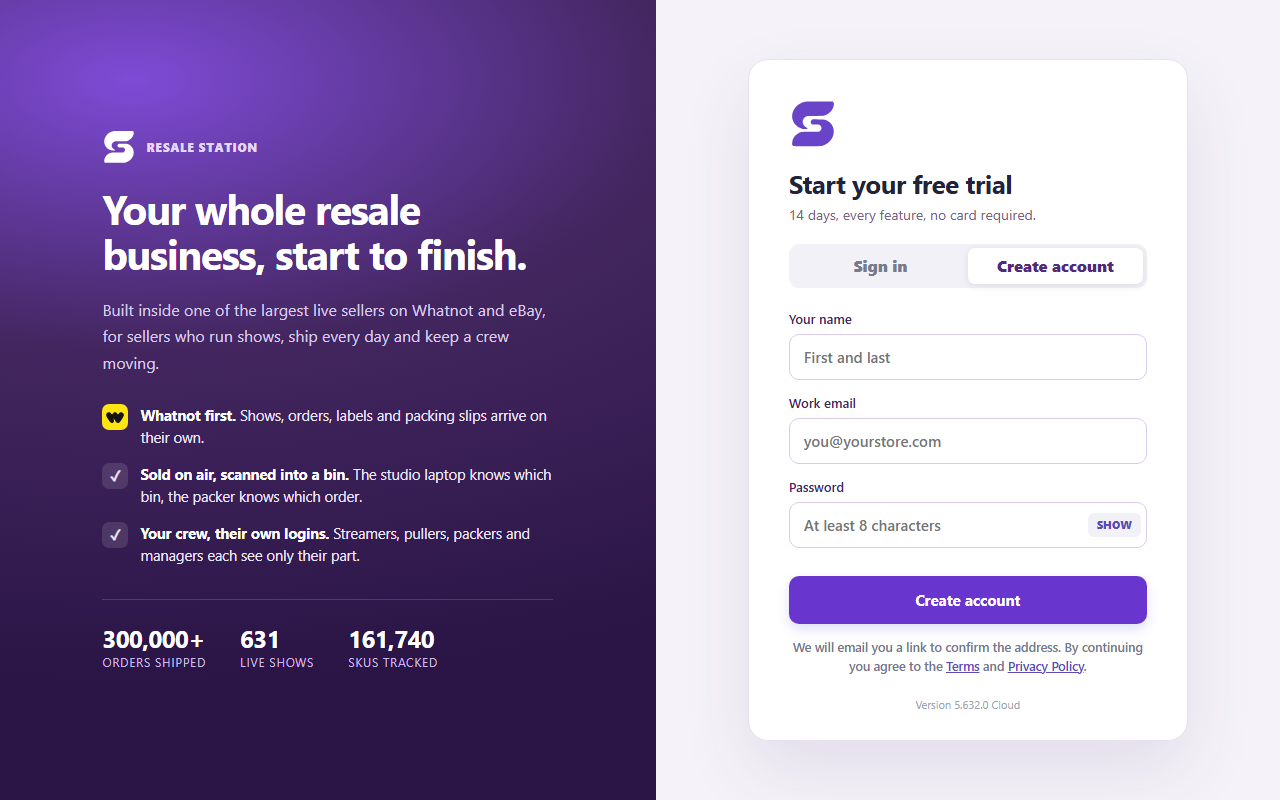
  1. Go to app.resalestation.com and press Create account: your name, your work email, a password of at least 8 characters.
  2. Open the confirmation email from Resale Station and press Confirm email address. You come straight back, signed in.
  3. Name your company and pick the time zone your warehouse is in - every show time, shift and timesheet is worked out in it. Tick the terms and press Create my company.

The trial starts the moment the company exists: 14 days, every feature, no card, up to 500 orders and 2,000 listings.
Tell us where you sell - screenshot
GUIDE 02 · 1 MINUTE

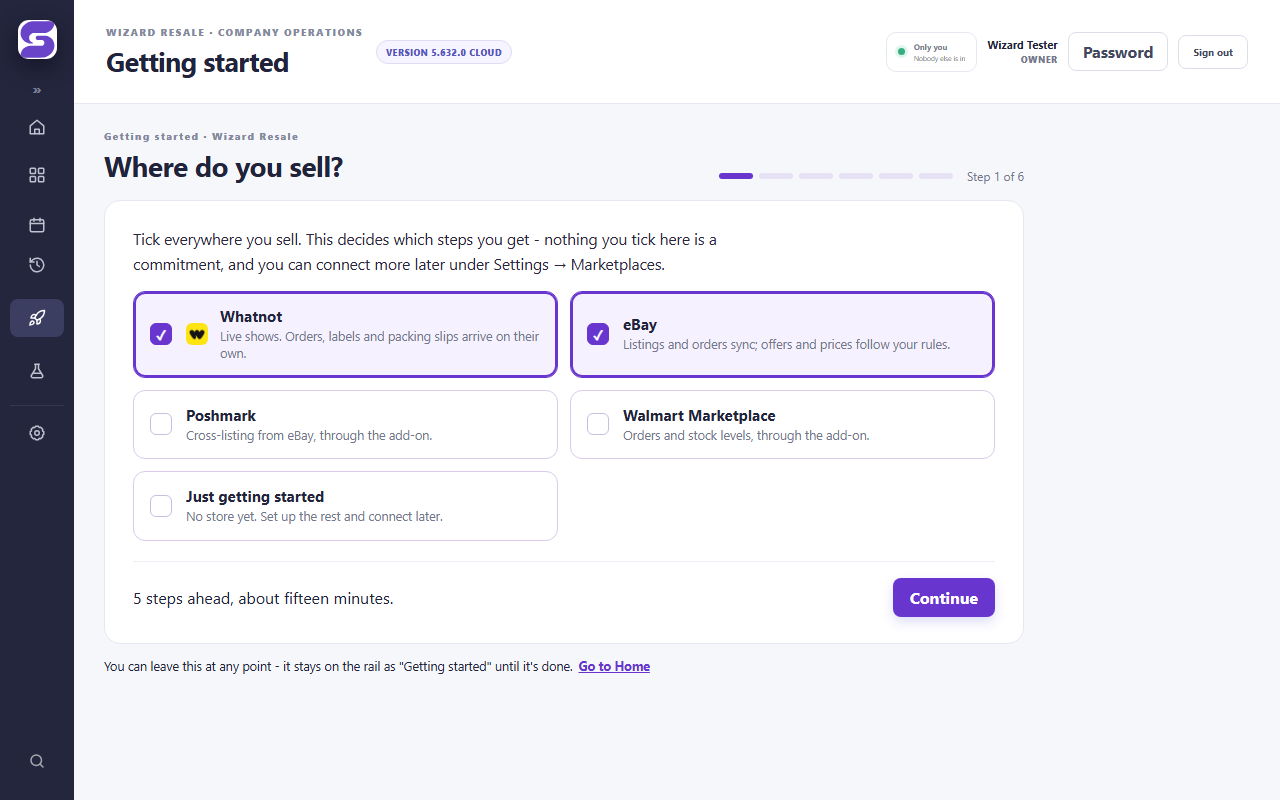
Tell us where you sell

  1. The first screen after your company exists asks where you sell: Whatnot, eBay, Poshmark, Walmart, or just getting started. Tick everything that applies.
  2. That decides which steps follow. Nothing you tick is a commitment - you can connect more later under Settings → Marketplaces.
  3. Press Continue. The walk-through stays on your rail as Getting started until every step is done, so you can leave and come back.
Connect Whatnot - screenshot
GUIDE 03 · 2 MINUTES

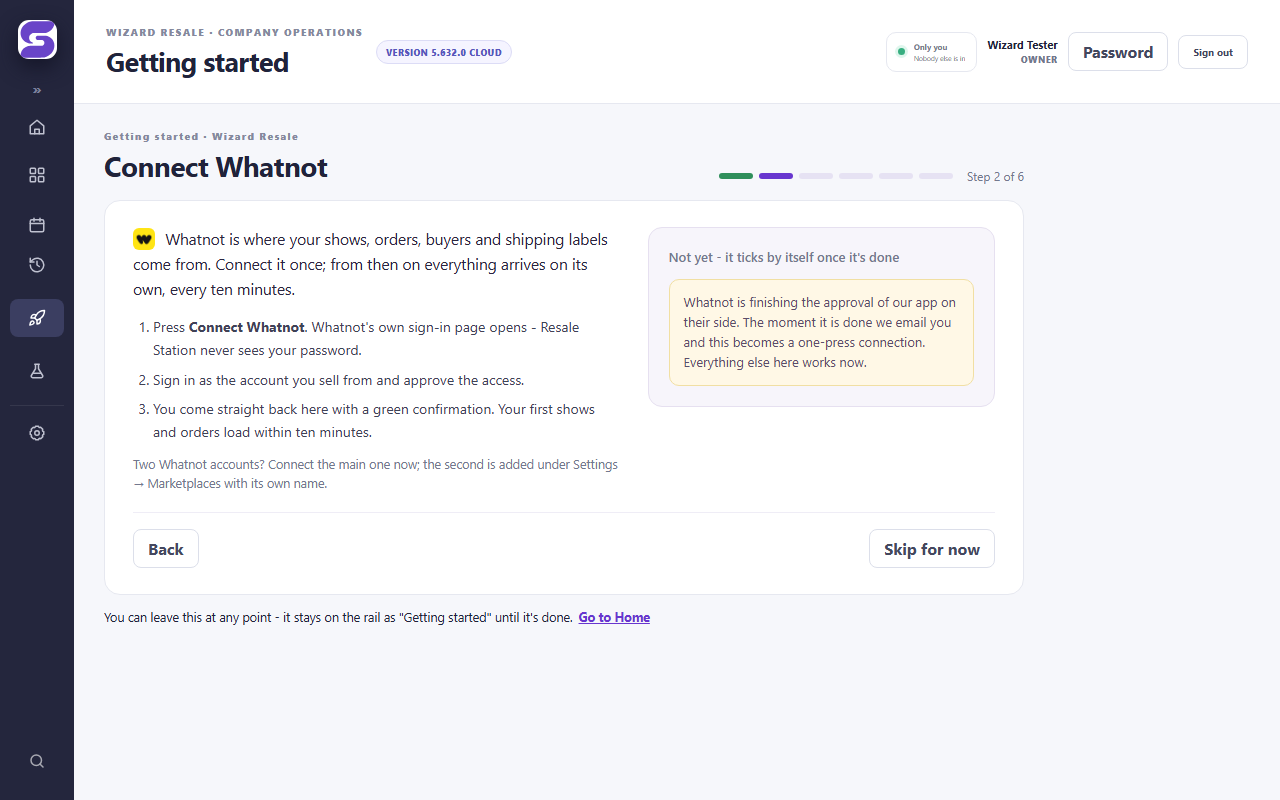
Connect Whatnot

  1. Press Connect Whatnot. Whatnot's own sign-in page opens - Resale Station never sees your password.
  2. Sign in as the account you sell from and approve the access Whatnot lists. You can withdraw it from Whatnot at any time.
  3. You come back with a green confirmation. Your first shows and orders load within ten minutes, and from then on every ten minutes.

Whatnot is finishing the approval of our app on their side; until then the button reads "Soon" and we email you the moment it is a one-press connection. Two Whatnot accounts? Connect the main one here; the second is added under Settings → Marketplaces with its own name.

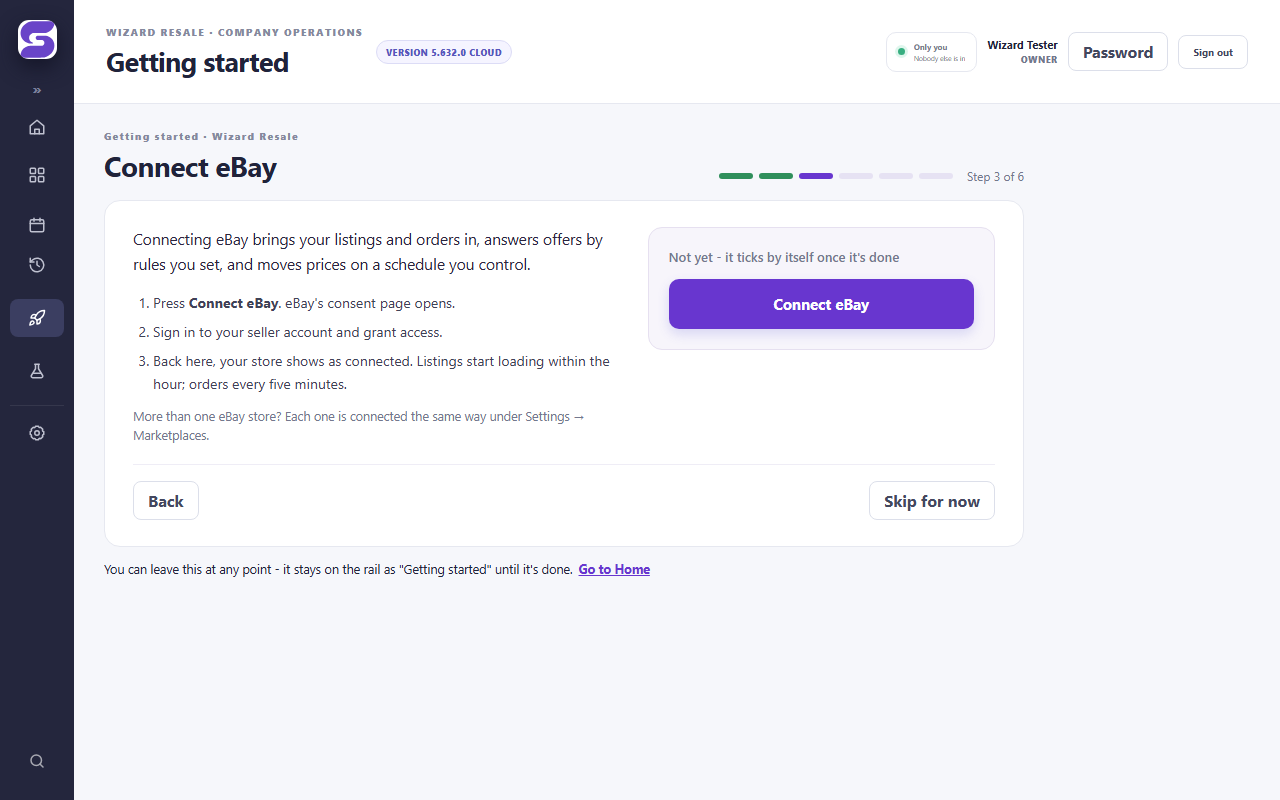
Connect eBay - screenshot
GUIDE 04 · 2 MINUTES

Connect eBay

  1. Press Connect eBay. eBay's consent page opens.
  2. Sign in to your seller account and grant access.
  3. Back in Resale Station your store shows as connected. Listings start loading within the hour; orders every five minutes. Offers are answered by the rules you set under Offers.

More than one eBay store? Each is connected the same way under Settings → Marketplaces, with its own store code.

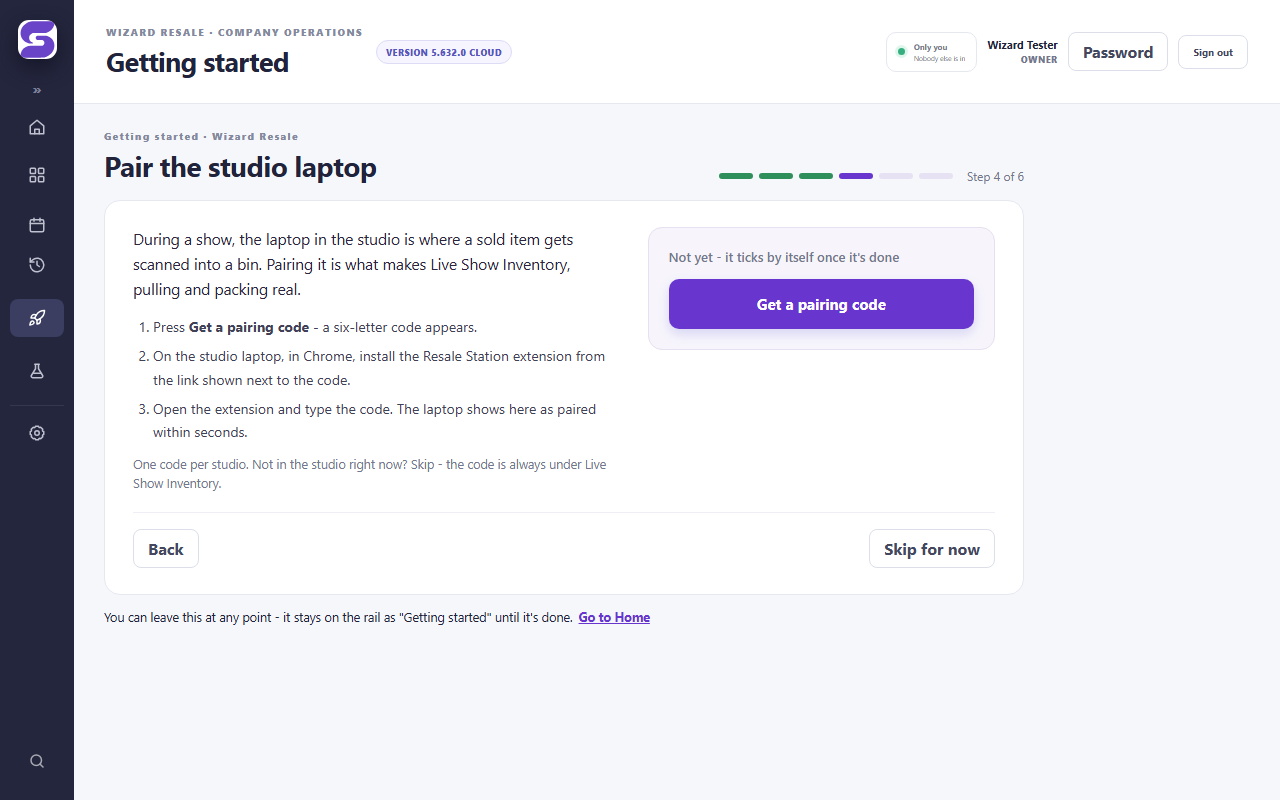
Pair the studio laptop - screenshot
GUIDE 05 · 5 MINUTES

Pair the studio laptop

  1. In the walk-through, or under Live Show Inventory, press Get a pairing code. A six-letter code appears.
  2. On the laptop in the studio, in Chrome, install the Resale Station extension from the link shown beside the code.
  3. Open the extension and type the code. The laptop shows as paired within seconds. One code per studio.

During a show that laptop is where a sold item gets scanned into a bin - it is what makes Live Show Inventory, pulling and packing real.

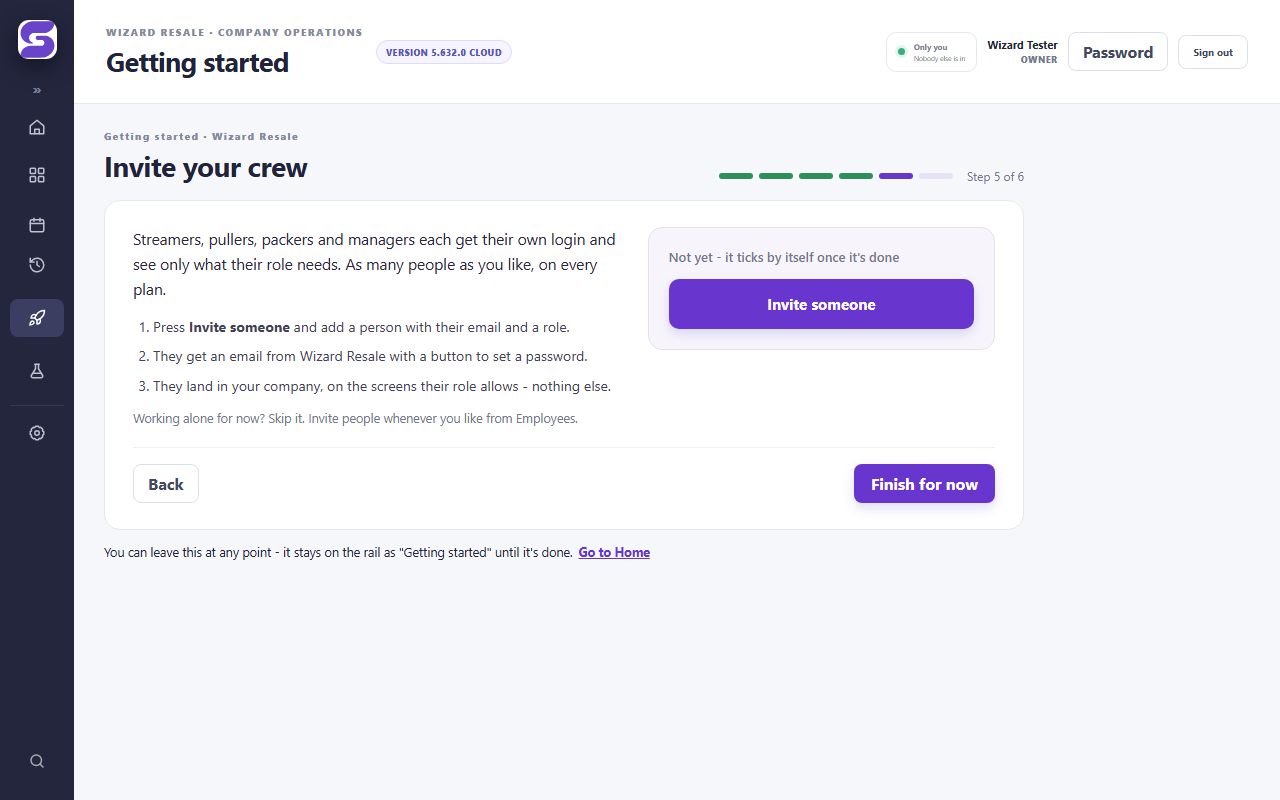
Invite your crew - screenshot
GUIDE 06 · 2 MINUTES PER PERSON

Invite your crew

  1. Press Invite someone (or open Employees) and add a person with their email and a role: streamer, puller, packer, supervisor, manager.
  2. They get an email from your company with a button to set a password.
  3. They land in your company on the screens their role allows - nothing else. As many people as you like, on every plan.
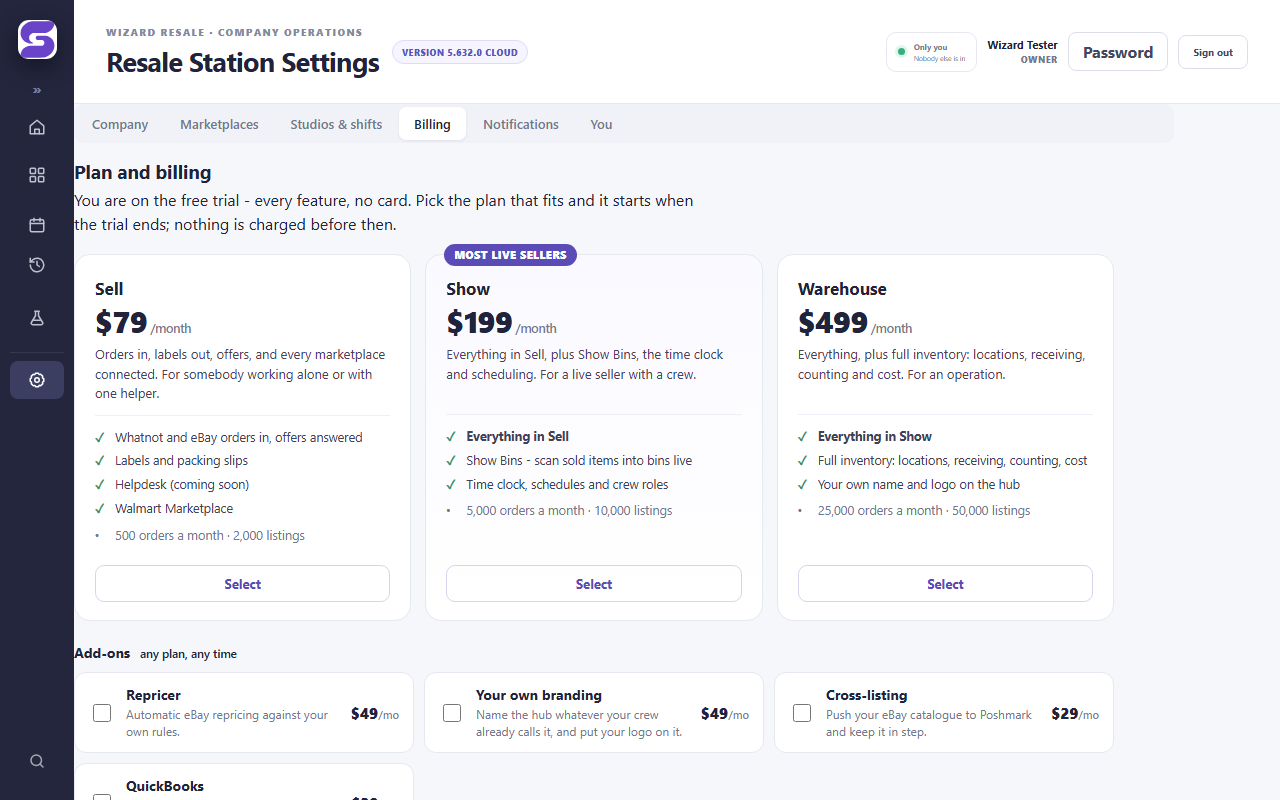
Pick a plan - screenshot
GUIDE 07 · 2 MINUTES

Pick a plan

  1. Open Settings → Billing. Sell, Show or Warehouse - each says what it includes; Show is what most live sellers pick.
  2. Tick any add-ons (repricer, cross-listing, QuickBooks, your own branding), then Continue to secure checkout. You finish on Stripe's page.
  3. Nothing changes until Stripe confirms. Cancel any month from the same screen; when a trial ends without a plan the account goes read-only and nothing is deleted.

Screenshots are from a demonstration company on the current release. Your screens carry your company's name.

QUESTIONS

What sellers ask,
before and after they start.

Straight answers.
Ask us the rest.

How does it connect to Whatnot?

Through Whatnot's official Seller API. You sign in on Whatnot's own page and grant Resale Station access; you can revoke it there any time. Nothing scrapes or automates the Whatnot website, and we never see or store your Whatnot password.

What hardware does the studio need?
  • A Windows laptop running Chrome in each studio, with the Resale Station extension installed — that is what reads the show and scans bins.
  • A barcode scanner (any USB scanner that types).
  • A DYMO LabelWriter for bin labels and mystery-lot barcodes.
  • For the time clock: any tablet on the wall with a camera.
  • Bins. Numbered containers on shelves. The system prints the labels.
I only sell on eBay. Is it still for me?

Yes — the Sell plan is exactly that: one click to connect, orders in, every buyer offer answered against your own floors with the reasoning written out, and your catalogue kept in sync. Add the repricer if you want prices moved on a schedule. You just won't use the studio side.

What about Poshmark?

Poshmark is through the $29 cross-listing add-on. It pushes your eBay catalogue to Poshmark and keeps quantities and prices in step, and it runs through a browser extension on your own machine with your own Poshmark login — Resale Station never holds it.

What happens when the 14 days are up?

Your account goes read-only: everything you loaded, scanned and set up is still there, and nothing is deleted. Pick a plan and it all comes back to life as you left it. The same happens if a trial passes 500 orders or 2,000 listings before the 14 days — the trial is for evaluating, not for running a large operation free.

How are orders and listings counted?

Orders are counted in the calendar month they land, across every connected marketplace, and the count resets on the 1st. Over your plan's allowance, each extra order is $0.02. Listings are your active listings right now, across your stores — a level, not a monthly count — and there is no overage on them; when you outgrow the allowance you move up a plan.

Is there a limit on crew logins?

No. Every plan includes as many logins as you have people. Each person gets their own login and a role — owner, manager, supervisor, puller, packer, streamer, or the tablet on the wall.

Can I bring my inventory over from SkuVault?

Yes, on the Warehouse plan. There is an import for SkuVault history, and your locations, products and costs come with it.

Who can see my data?

Your company, and only your company. Every row belongs to one company and the database enforces it — not just the screens — and we test that fence by signing in as real users of two different companies before every change ships. Marketplace connections are grants you can revoke on the marketplace's side. We never store an eBay, Whatnot or Poshmark password.

How do I get help?

Email [email protected], any hour of any day. Our technology assistants answer around the clock and a person steps in for anything they cannot settle. We run our own warehouse on this system, so that person has usually had your problem.

Whatnot says the connection failed. What now?

Press Connect again from Home - the approval only takes once. If it fails twice, email us the time you tried and which Whatnot account you were signed in as; the reason is recorded on our side and we can tell you exactly what Whatnot said.

Where do my orders come from - do I still need my spreadsheet?

No. Once a marketplace is connected its orders, buyers and labels arrive on their own: Whatnot every ten minutes, eBay every five. The Fulfillment and Live Show Inventory screens are the list; the packing bench works from them.

Can I change my company name, time zone or logo later?

Yes - Settings → Company. The name is what your crew see in the sidebar and your buyers see on packing slips. The logo and colours are part of the branding add-on (included in Warehouse).

I lost my password.

On the sign-in page press Forgot password? and we email you a link to set a new one. Crew members do the same; an owner cannot see or set anybody's password.

How do I cancel?

Settings → Billing → Manage billing opens your Stripe billing portal, where you can cancel, change the card or download invoices. The plan stays on until the end of the month you paid for; after that the account is read-only, nothing is deleted, and you can come back any time.

Can I export or delete my data?

Export any time from Settings → Company → Cloud data & backup (CSV and a full backup). To delete your company entirely, email us from the owner's address and it is gone within 30 days, except what tax law makes us keep - the Privacy Policy has the detail.

SYSTEM STATUS

Is everything running?

Read live from the platform.
Updated every five minutes.

Reading…

This is the platform's own machinery - the syncs that bring orders in and the senders that put offers and prices out. Your company's own connections are on Home, in the app.